

How to troubleshoot an automatic door in New York comes down to four checks in order: confirm power and the mode switch, clear the path and track, clean and check the sensors, then test the door’s safety response. Most doors that stick, slam, or open on their own trace back to one of those areas, and the rest need a technician.
If you manage a storefront, office lobby, or healthcare entrance in New York or New Jersey, a door that misbehaves is a safety and liability problem, not just an annoyance. The steps below are written for building staff, and they stop at the point where a trained technician has to take over.
Quick Answer: How to Troubleshoot an Automatic Door
To troubleshoot an automatic door, check power and the mode switch, clear the path and track, clean and re-check the sensors, then run the daily safety test; if the door still misbehaves, stop using it in automatic mode and call a technician.
- Power and mode: confirm the breaker is on and the switch is set to Automatic, not Off, Hold-Closed, or Hold-Open.
- Path and track: remove carts, mats, displays, and debris from the opening and track.
- Sensors: wipe the lenses with a soft cloth and watch the status lights.
- Safety test: walk up, stand in the path, and step into the zone as the door closes.
- Escalate: if the door fails any test, take it out of automatic use and call 516-678-4440, extension 2, for 24/7 emergency service.
Request Automatic Door Service
Safety Rules Before You Troubleshoot an Automatic Door
Never disable a sensor or bypass a safety feature to get a door moving; take the door out of automatic use instead.
- Do not cover, unplug, or turn off a sensor to stop a nuisance fault.
- Cut power at the switch or breaker before reaching into the header or touching the operator, and leave header work to trained technicians.
- Keep people clear of the opening while you test.
- Stop using the door in automatic mode if it fails a daily safety check, closes on a person, or does not release at the breakout panel. AAADM safety labels tell owners not to use a door that fails its checks and to call a qualified service company.
- Leave speed, force, and detection-field settings to technicians, because those settings are tied to ANSI/BHMA safety requirements.
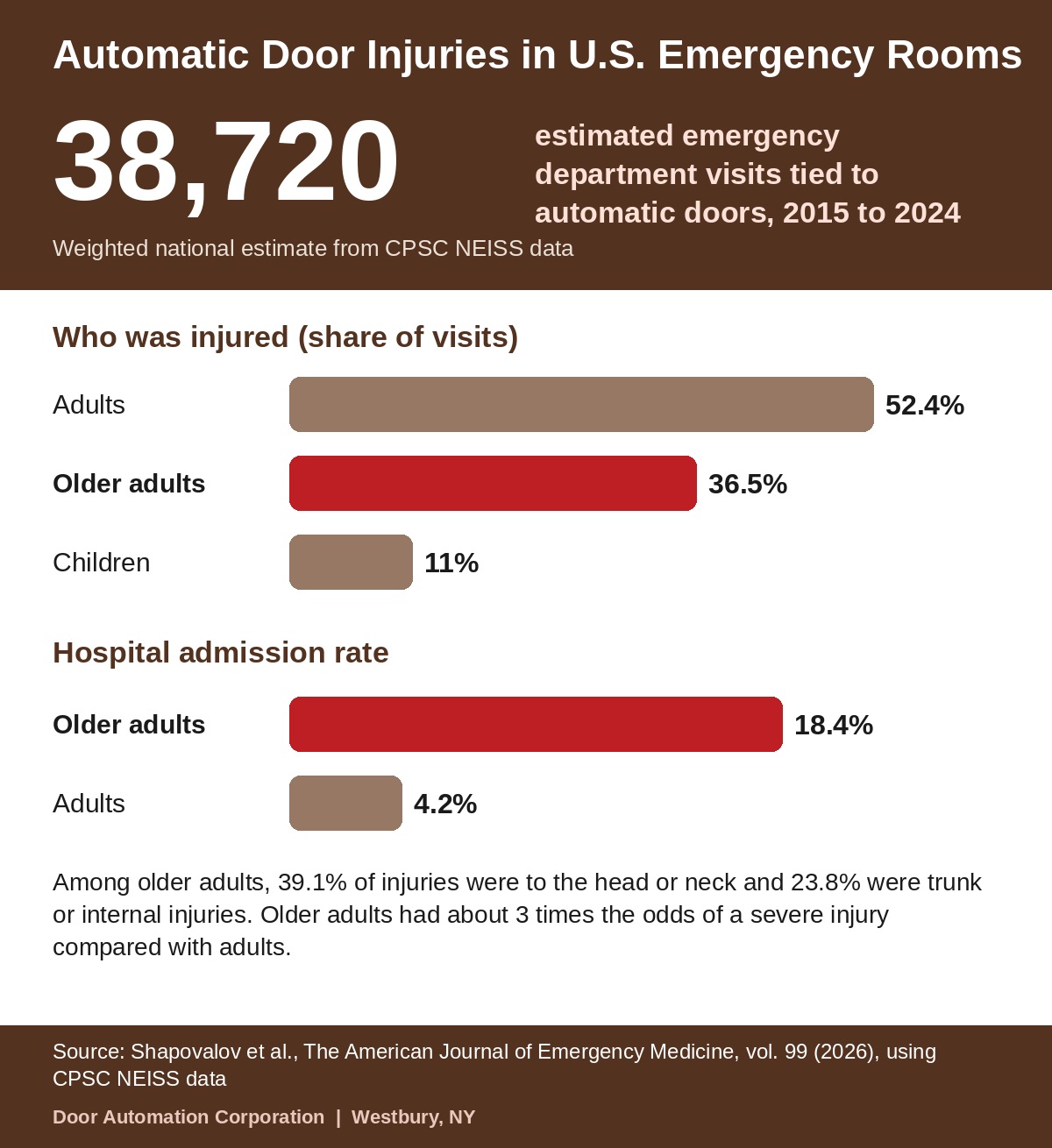
The risk is real. A 2026 study in The American Journal of Emergency Medicine analyzed U.S. Consumer Product Safety Commission injury data and estimated 38,720 emergency department visits tied to automatic doors from 2015 to 2024. Older adults made up 36.5% of those visits and were admitted most often, at 18.4% compared with 4.2% for adults.
Automatic Door Troubleshooting Chart: Symptoms, Causes, and Fixes
Match the symptom to the most likely cause, run the first check, and call a technician when the last column applies.
| Symptom | Most likely cause | Check first | Call a technician if |
|---|---|---|---|
| Door will not open | No power, mode switch on Off or Hold-Closed, blocked or dirty activation sensor | Breaker, mode switch, sensor lens and status light | The sensor light never changes or the door has no power response |
| Door will not close | Blocked beam, dirty presence sensor, object in the detection zone, switch on Hold-Open | Clear the threshold, wipe the lens, confirm the mode switch | The door stays open with a clear path |
| Door opens by itself | Motion sensor reacting to traffic, foliage, swinging signs, or reflections | Look for moving objects in view of the sensor | It continues after you remove the likely sources |
| Door opens late | Activation field too small or aimed too low | Walk toward the door from several angles | The field needs re-aiming or adjustment |
| Door slams or closes too fast | Speed or force settings off, worn operator, binding panel | Observe the cycle and note when it happens | Always, because this is a safety issue |
| Door closes on a person | Blind spot in the presence zone, dirty lens, misaligned beam | Take the door out of automatic use | Immediately |
| Door stays open too long | Presence field too large, sensitivity too high, display in the zone, hold-open time set long | Remove items from the zone and review the timer | It continues after the zone is clear |
| Door stops mid-cycle | Obstruction, interrupted beam, worn rollers, dirty track | Clear the track and watch the beam light | You hear grinding or the stops repeat |
| Door drags, grinds, or rattles | Worn rollers, debris, bent track, loose guides | Look for debris in the track | Always, because rollers and guides need a technician |
| Door hesitates or jerks | Flickering sensor signal, low voltage, controller fault | Watch the status lights during a cycle | The flicker or jerking returns |
| Breakout panel will not release | Misaligned panel, worn latch, damaged hardware | Do not force the panel | Always |
| Door stuck open or stuck closed | Power loss, failed control, blocked track, lock or operator fault | Breaker, mode switch, obvious obstruction | The door blocks access or leaves the building unsecured |
Seven Safe Steps for Troubleshooting an Automatic Door
Work through these seven checks in order, because most faults show up in the first four.
- Confirm power and mode. Check that the door has power, the breaker or disconnect is on, and the mode switch is set to Automatic. A switch left on Off, Hold-Closed, or Hold-Open is one of the most common reasons a working door looks broken.
- Clear the opening. Remove carts, mats, signs, displays, and debris from the approach and from the sliding or swinging path. Objects in the detection zone can hold a door open or keep it from closing.
- Inspect the track and threshold. Look for debris, road salt, ice melt, and slush, which build up fast on New York entrances in winter. Sweep or vacuum loose material, and never oil or force a binding panel.
- Clean the sensors. Wipe each lens and cover with a soft microfiber cloth and a mild cleaner. Harsh solvents can haze plastic covers and reduce detection.
- Read the status lights. Most sensors and controllers have indicator lights that show when a field is active, blocked, or faulted. Watch them while you walk through the zone and note what changes.
- Run the safety test. Walk toward the door at a normal pace, stand still in the path, then step into the zone as the door begins to close. The door should open early, hold open, and stop and reopen.
- Record and escalate. Write down the symptom, the time, the weather, and what you tried. If the fault returns, take the door out of automatic use and call for service.
Fixing Common Automatic Door Problems
Each problem below lists the likely cause, a safe check, and the point where a technician should take over.
How to Troubleshoot an Automatic Door That Won’t Open
An automatic door that won’t open usually has no power, the wrong mode setting, or an activation sensor that is blocked or dirty.
- Check the breaker, the operator power switch, and the mode switch.
- Clean the activation sensor and look for anything blocking its view.
- Watch the sensor’s status light as you approach; it should change when it detects you.
Call a technician if the light never changes or the operator shows no sign of power.
How to Troubleshoot an Automatic Door That Won’t Close
A door that won’t close is usually being told someone is in the path, through a blocked beam, a dirty presence sensor, or an object in the zone.
- Clear the threshold and the swing or slide path completely.
- Wipe the presence sensor lens and check that the photo beam housings are aligned.
- Confirm the mode switch is not on Hold-Open.
If the path is clear and the door still stays open, the sensor or control needs professional service.
Automatic Door Opens by Itself
Ghost openings usually come from a motion sensor reacting to movement outside the door, such as traffic, foliage, swinging signs, or reflections.
- Look for moving objects in view of the approach sensor, including flags, banners, and glass reflections.
- Check for vibration at the sensor bracket and tighten loose hardware.
- Note whether it happens at certain times, since low winter sun through a glass vestibule can trigger some sensors.
Sensitivity and field changes belong to a technician, because a field set too small makes the door open late.
Automatic Door Slams, Closes Too Fast, or Opens Late
Speed and timing problems point to settings, wear, or a mis-aimed sensor, and each one is a safety issue.
A door that slams or closes too fast can strike a person before the sensors react, and a door that opens late forces people to wait or walk into it. Do not adjust speed or force yourself. Take note of when it happens and request service, and keep people clear of the opening until it is repaired.
Automatic Door Stuck Open or Closed
A door stuck open or closed is usually a power loss, a failed control, a blocked track, or a lock or operator fault.
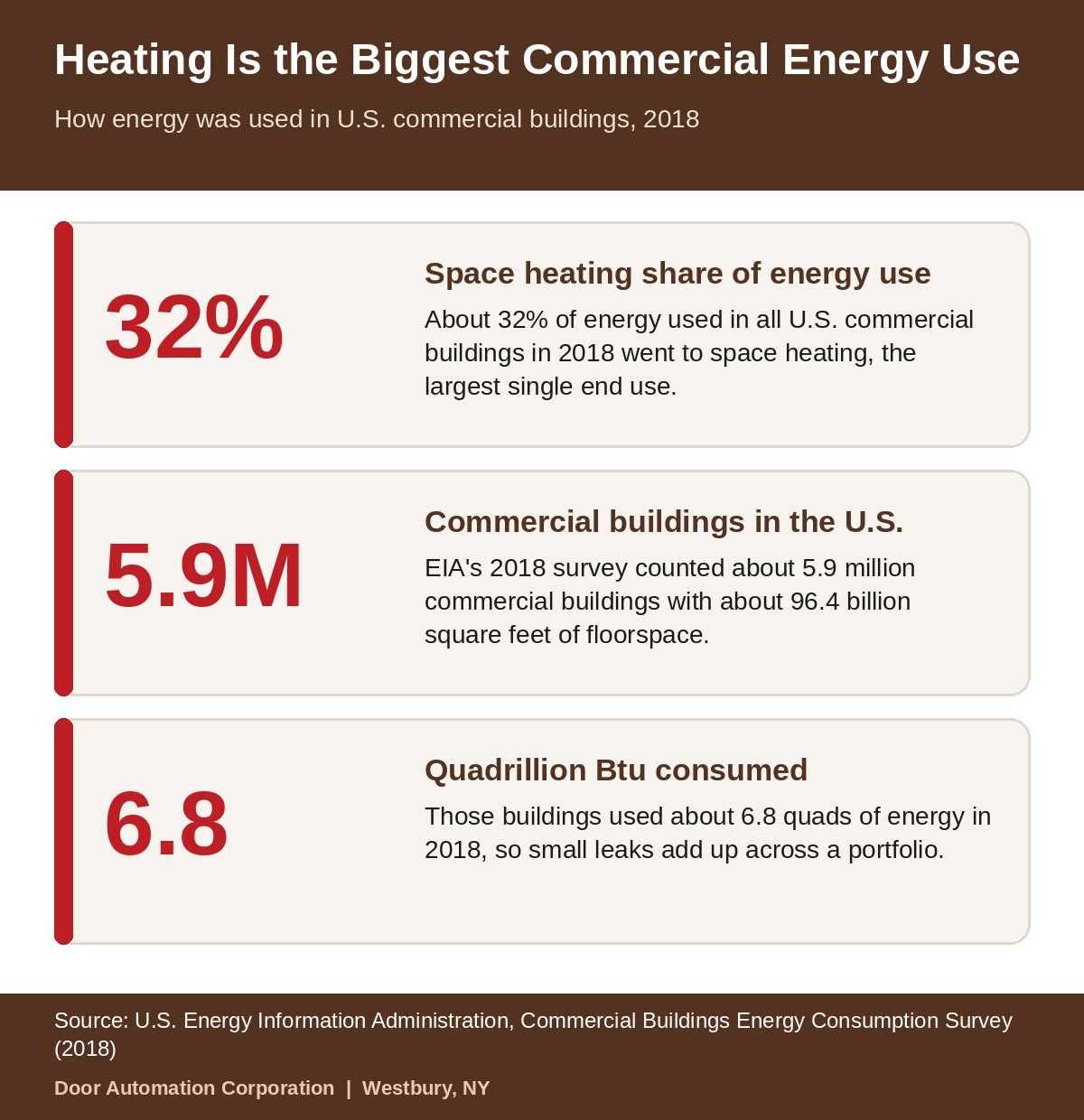
A stuck-open door also costs money. The U.S. Energy Information Administration reports that about 32% of energy use in U.S. commercial buildings in 2018 went to space heating, the largest single end use, so an entrance that cannot close in a New York winter wastes heat quickly.
If the door blocks access or leaves the building unsecured, request 24/7 emergency service for stuck or unsafe doors instead of waiting for a routine visit.
Automatic Door Drags, Grinds, or Stops Mid-Cycle
Dragging and grinding point to worn rollers, a dirty or bent track, or a binding panel.
Clear any visible debris and check for obstructions, but leave rollers, guides, and track repair to a technician. Running a dragging door forces the operator to work harder and shortens its life.
Troubleshooting Sliding, Swinging, and Revolving Doors
Each door type fails in different places, so the first checks change with the door.
| Door type | Check first | Common faults | Leave to a technician |
|---|---|---|---|
| Sliding | Track, threshold, bottom guide, header sensors | Worn rollers, debris, sensor misreads, breakout panel problems | Roller and guide replacement, breakout hardware, operator work |
| Swinging | Mode switch, door arm, wall or floor activation devices, sensors | Loose arm, closing speed too fast or slow, activation device failure | Operator and arm repair, speed and force settings |
| Revolving | Power, obstructions, stop and safety sensors | Safety stops tripping, drive faults, slow rotation | Any adjustment or repair |
For sliding entrances, our sliding entrance technicians handle rollers, tracks, sensors, and breakout panels.
Full-energy doors follow ANSI/BHMA A156.10, low-energy swing and power-assist doors follow A156.19, and low-energy sliding and folding doors follow A156.38, so the safe settings differ by door category. Service for automatic swing operators and low-energy doors covers the operator, arm, and closing speed.
Revolving doors have drive and safety-stop systems that need trained hands, so revolving door lobbies should get any adjustment or repair from a technician.
Automatic Door Sensors: Types, Faults, and Quick Checks
Automatic door sensors do three jobs: open the door, keep it open while someone is in the path, and stop or reverse it if someone enters the danger zone.
| Sensor | Job | Common fault | Quick check |
|---|---|---|---|
| Approach (radar or infrared) | Opens the door as someone approaches | Late opening, ghost openings, drift | Walk toward the door from several angles |
| Presence (active infrared) | Holds the door open and protects the swing or slide path | Dead zones from dirt or mis-aimed brackets, blocked by displays | Stand still in the path and confirm the door holds |
| Threshold photo beam | Stops a sliding door from closing on someone stepping in | Misalignment, bumped housings, sunlight interference | Break the beam and confirm the door will not close |
| Safety mat | Detects weight in the path of older swing installations | Edge damage, moisture | Step on the mat and watch the door respond |
| Touchless wave sensor | Opens the door without touching a plate | Range set too short or long, light interference | Wave at the stated distance and note the response |
Dirt, loose brackets, and moving objects cause most sensor faults. Surfaces matter too: wet floors, dark mats, and glossy tile change how some infrared presence sensors read the floor, so a door that worked all summer can start misbehaving after a rainy or snowy week. If cleaning and a clear path do not fix the behavior, the detection fields need a professional check.
Daily Safety Check and Annual Inspection
AAADM guidance calls for a daily safety check by staff and an inspection by an AAADM-certified inspector at least once a year.
- Walk toward the door at a normal pace; it should open before you reach it.
- Stand still in the path; the door should stay open.
- Step out of the path; the door should close after its hold-open time.
- Check that required signs and decals are present and readable.
- Look over the door and hardware for damage, loose parts, or missing covers.
The American Association of Automatic Door Manufacturers trains and certifies inspectors who check doors against ANSI/BHMA A156.10, and the inspector records the result on the label attached to the door.
Door Automation offers annual compliance inspections by certified technicians, and a written log of your daily checks gives that technician a head start.
Preventive Maintenance That Prevents Most Door Faults
Most nuisance faults come from dirt, loose hardware, and drifting settings, which routine maintenance catches early.
- Clean sensor lenses and track on a regular schedule, more often in winter when salt and slush collect.
- Keep displays, planters, and signs out of the detection zones, and recheck after merchandising changes.
- Tighten sensor brackets and cover screws that vibrate loose.
- Keep a short logbook of faults with the date, weather, and time of day so patterns show up.
- Cross-train staff so the daily check never lapses during vacations or turnover.
Facilities that want this handled for them often set up scheduled preventive maintenance around each door’s traffic and environment.
Properties with several busy entrances can lock in the schedule with a recurring service agreement so inspections and repairs are planned instead of reactive.
When to Repair Sensors, Replace Parts, or Modernize the Door
Repair is enough when one part has failed, and modernization makes sense when faults keep recurring or parts are obsolete.
- Repair or adjust: a dirty or mis-aimed sensor, loose bracket, worn roller, or setting that drifted.
- Replace the part: a sensor that keeps faulting after cleaning and alignment, or a component that no longer holds adjustment.
- Modernize: older operators, controls, and sensors that are discontinued, unreliable, or hard to keep within safe limits.
When the repair history starts to add up, a technician can upgrade the operator, controls, and sensors so the entrance runs reliably again.
Buildings with inspection or documentation requirements can also use entrance safety compliance support to keep records and settings in order.
Automatic Door Repair in New York: When to Call Door Automation
Call for automatic door repair in New York when a door closes on people, will not release, stays stuck, or keeps faulting after the basic checks.
Door Automation Corporation is a Westbury-based commercial entrance team serving New York City, Long Island, Westchester, and Northern New Jersey. Technicians diagnose sensors, operators, tracks, rollers, and controls, repair the root cause, and test the door’s safety response before leaving. Emergency service is available 24/7 at 516-678-4440, extension 2.
To book a visit, schedule a safety and performance assessment and describe the door and the symptom.
Property teams comparing options can see the full range of commercial door services that Door Automation handles.
Request Automatic Door Service
Automatic Door Troubleshooting FAQs
Why won’t my automatic door open?
An automatic door that won’t open usually has no power, a mode switch set to Off or Hold-Closed, or an activation sensor that is blocked or dirty. Check the breaker, the switch, and the sensor lens. If none of those fix it, call a technician rather than forcing the door.
Why is my automatic door staying open?
A door that stays open is usually being told someone is in the path. Look for an object in the detection zone, a dirty presence sensor, a blocked beam, or a mode switch left on Hold-Open. If the path is clear and the door still will not close, the sensor or control needs service.
How do I reset an automatic door?
Many doors recover after power is cut at the operator switch or breaker and then restored, but reset steps vary by manufacturer. A reset clears a temporary glitch and does not fix the cause, so call for service if the problem returns.
How do I know if an automatic door sensor is bad?
Signs of a failing sensor include late openings, ghost openings, a door that closes with someone nearby, indicator lights that flicker or stay off, and faults that repeat after cleaning and a clear path. Clean the lens first, then have a technician test and adjust the detection fields.
Can I adjust automatic door sensors myself?
Building staff can safely clean lenses and clear the area. Aiming sensors, changing detection fields, and adjusting speed or force settings affect safety performance and should be done by a trained technician following the manufacturer’s manual.
How often should an automatic door be inspected?
AAADM safety labels call for a daily safety check by building staff and an inspection by an AAADM-certified inspector at least once a year. Busy or weather-exposed entrances often benefit from extra maintenance visits between annual inspections.
Why does my automatic door keep opening and closing?
Repeated cycling usually points to a sensor reacting to movement, reflections, or vibration near the door, or to a loose or failing connection. Remove nearby moving objects and check for sunlight or reflective surfaces. If it continues, a technician needs to adjust or replace the sensor.
Can I use an automatic door manually if the power is off?
Many sliding and swinging doors can be opened by hand in a power failure, and the ADA standards require a 32-inch minimum clear opening in both power-on and power-off mode. How the door behaves depends on its operator and lock, so confirm it opens safely and call for service if it does not.
When should I call for automatic door repair in New York?
Call right away if a door closes on a person, will not release at the breakout panel, is stuck open or closed, or keeps faulting after the basic checks. Door Automation offers 24/7 emergency service at 516-678-4440, extension 2.